Standalone mode: what GridR does for you
If you’ve followed the previous tutorials, you’ve already been using GridR’s standalone mode — it’s the default. This page makes that implicit machinery visible: what GridR runs on your behalf before the actual interpolation, why it exists, and the parameters it enables.
What you’ll learn
What standalone mode actually does behind the scenes
How it interacts with boundary conditions and B-Spline prefiltering
The
trust_paddingparameter and what it controlsThe
array_in_mask_safe_winparameter — telling GridR what it doesn’t need to checkWhen you’d want to disable standalone mode
What standalone mode actually does
When you call array_grid_resampling with standalone=True (the default), GridR runs a preparation pipeline before invoking the core interpolation. The pipeline contains five steps:
Grid metrics — Compute the resolution and orientation of your target grid.
Source extent — Derive the rectangular region of the source array that the resampling actually touches. Outside this region, the source data is irrelevant to the result.
Padding — Allocate (if strictly necessary) an internal buffer large enough to hold the full interpolation support of every reachable target coordinate. Whether or not
boundary_conditionis set, standalone mode always ensures this buffer is in place; whatboundary_conditioncontrols is how the out-of-source region of that buffer is filled — by reflection, symmetry, constant value, etc.Mask preparation — Adjust the input mask (if any) to reflect the padding.
B-Spline prefiltering — For B-Spline interpolators, run the recursive prefilter in-place on the (possibly padded) source array. Mask dilation is applied automatically based on the prefilter’s influence radius.
Safe window - Create or update a safe window definition to speedup computations.
Each of these steps is something you’d otherwise have to do by hand. Standalone mode is GridR being a good neighbour.
Two regions to distinguish
Before going further, it’s worth pinning down two concepts that look similar but mean different things:
The interpolation support is the set of source samples needed to evaluate a given target coordinate’s stencil. For cubic interpolation it’s mathematically a 4×4 neighbourhood (for performance issue its a 5x5 neighbourhood in GridR’s implementation); for B-Spline of order n it’s larger and depends on the prefilter’s truncation index.
The valid output domain is the set of target coordinates whose result GridR will mark as trustworthy in the output mask.
These two regions don’t have to coincide. A target coordinate whose interpolation support reaches outside the original source array can still produce a usable output value if the out-of-source samples are filled by a boundary condition — but it’s a separate decision whether the output mask should consider that value valid.
Standalone mode always ensures the interpolation support is available in memory. The parameters boundary_condition and trust_padding, covered in the next examples, control how the valid output domain is decided.
Example 1: A boundary condition just works
Let’s revisit a situation from the Boundary conditions tutorial: we zoom 4× into a cropped patch of the mandrill, using cubic interpolation. Near the edges, the cubic stencil reaches outside the source array.
Without a boundary condition, those target coordinates are flagged as out-of-domain and produce nodata_out in the output. With boundary_condition="reflect", those same coordinates remain valid: standalone mode fills the out-of-source region of its internal buffer using reflection, and the cubic stencil reads from there.
# Crop a small patch and create a 4x zoom grid covering it
win_center = np.array((58, 175))  # left eye
win_shape = np.array((80, 80))
win = np.array((win_center - win_shape // 2,
                win_center - win_shape // 2 + win_shape - 1)).T
array_in_cropped = np.ascontiguousarray(
    array_in[win[0][0]:win[0][1]+1, win[1][0]:win[1][1]+1]
)

zoom = 4
x = np.arange(0, array_in_cropped.shape[0], dtype=grid_dtype)
y = np.arange(0, array_in_cropped.shape[1], dtype=grid_dtype)
xx, yy = np.meshgrid(x, y)
# With boundary_condition="reflect", standalone mode fills the
# out-of-source region of its internal buffer by reflection, so the
# cubic stencil always has data to read.
array_out, mask_out = array_grid_resampling(
    interp="cubic",
    array_in=array_in_cropped,
    grid_row=yy,
    grid_col=xx,
    grid_resolution=(zoom, zoom),
    array_out=None,
    array_out_mask=True,
    nodata_out=None,
    boundary_condition="reflect",
    trust_padding=True,    # required when boundary_condition is set
    standalone=True,       # the default; shown here for emphasis
)
print(np.min(array_out), np.max(array_out), array_out.dtype)
print(array_out.shape)
12.0 240.4921875 float64
(317, 317)
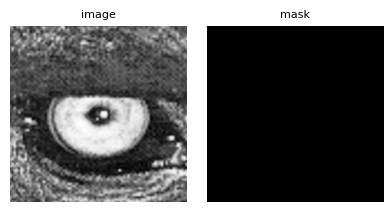
Notice that the output mask is fully valid: the boundary condition was applied to the mask as well as the data, so edge samples whose stencil reaches into the reflected region are now considered trustworthy. That’s what trust_padding=True declares — the next section shows the alternative.
Example 2: trust_padding — making an implicit decision explicit
When you provide a boundary_condition, you face a choice: should the out-of-source region — the part of the buffer filled by reflection, symmetry, or edge replication — be considered as trustworthy as the original data?
The trust_padding parameter exposes this decision:
trust_padding=True— target coordinates whose stencil reaches into the boundary-extended region are considered valid. Their output values come from the chosen fill (reflection, etc.) and the output mask flags them as good.trust_padding=False— those same coordinates are flagged as invalid in the output mask, even though the interpolation can still be computed from the filled buffer.
Let’s run the same resampling twice to see the effect.
# Same setup as before, but trust_padding=False this time
array_out_strict, mask_out_strict = array_grid_resampling(
    interp="cubic",
    array_in=array_in_cropped,
    grid_row=yy,
    grid_col=xx,
    grid_resolution=(zoom, zoom),
    array_out=None,
    array_out_mask=True,
    nodata_out=None,
    boundary_condition="reflect",
    trust_padding=False,   # <-- this is the change
    standalone=True,
)
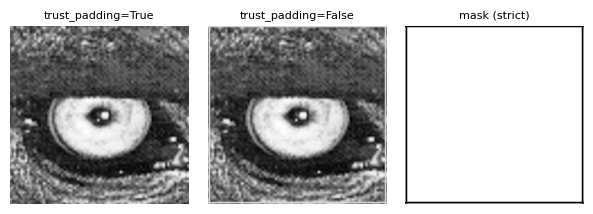
With trust_padding=False, the output mask now flags edge samples as invalid wherever the cubic stencil overlaps the reflected region, with the exception of whole integer target coordinates. The interpolated values are still computed from the boundary fill, but they’re no longer claimed to be valid.
Which one should you use?
trust_padding=Trueis the right choice if your downstream processing accepts boundary-extrapolated samples as valid data — for example, if you’re producing a visual that will be cropped, or if you’ve validated upstream that reflection is an acceptable extension.trust_padding=Falseis the right choice if you need strict validity propagation, e.g. for scientific computations where samples drawn from a boundary fill shouldn’t carry the same weight as actual measurements.
Note for B-Spline interpolation: the prefilter automatically erodes the trusted region by its influence radius regardless of trust_padding. You’ll see this as nodata_out values near the corners under identity transforms with B-Spline — that’s the prefilter being conservative, not a bug.
Safe window creation and update
As mentioned in the masking tutorial, you can instruct GridR to skip the per-sample validity check over a region by declaring a safe window via array_in_mask_safe_win.
In standalone mode, if no input mask is provided and either trust_padding=False or a B-spline interpolator is selected, GridR automatically declares an internal safe window over the (eventually cropped) source array, avoiding redundant validity checks.
When B-spline prefiltering is applied, GridR also automatically erodes the safe window — whether user-defined or internally created — by the prefilter’s influence radius. No manual adjustment is needed when switching interpolators.
When to switch standalone mode off
There are situations where you’d want to bypass standalone preprocessing entirely:
You’re integrating GridR into a larger pipeline that already handles padding, mask preparation, and prefiltering upstream — running them again is wasteful.
You’re applying a coordinate-system shift via
array_in_originthat wouldn’t survive the standalone preprocessing.You’re processing a single tile of a larger dataset and the preprocessing has been amortised across all tiles.
In these cases, set standalone=False. You take on the responsibility for everything the pipeline above was doing for you — make sure that’s a trade-off you actually want.
The next tutorial, Pipeline integration, walks through this in detail.