Geometric transformations
Building on the identity transform, this page demonstrates how to construct grids representing common geometric operations: translation, rotation, and resolution-based zoom.
What you’ll learn
Building a translation grid
Building a rotation grid
Using
grid_resolutionto apply a zoomSwitching between
cubicandnearestinterpolators
Playing with resolution to apply a zoom
The array_grid_resampling method uses the grid_resolution parameter to insert additional nodes between existing grid nodes. This insertion is achieved through bilinear interpolation, with the oversampling factors for both rows and columns specified in the grid_resolution parameter.
While the primary purpose of the grid_resolution is to control computation time and grid storage, in this case, we use it to perform a zoom operation, increasing the row resolution by a factor of 2 and the column resolution by a factor of 3.
# Set resolution to the target zoom factors
resolution = (2, 3)

# Lets call the grid resampling
array_out_id_zoom_2_3, _ = array_grid_resampling(
        interp="cubic",
        array_in=array_in,
        grid_row=yy,
        grid_col=xx,
        grid_resolution=resolution,
        array_out=None,
        win=None,
        array_in_mask=None,
        grid_mask=None,
        array_out_mask=None,
        nodata_out=None,
        standalone=True,
        boundary_condition=None,
        trust_padding=False,
        )
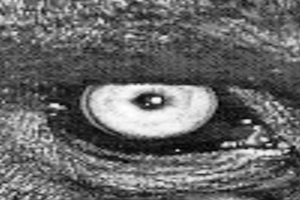
Note : The above plot is centered on the left eye of the mandrill only to limit the displayed area.
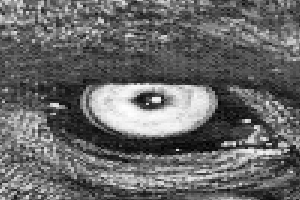
In order to illustrate the change of interpolation method, we will use here the nearest identifier in order to adress a nearest neighbor interpolation.
# Lets call the grid resampling
array_out_id_zoom_2_3_nearest, _ = array_grid_resampling(
        interp="nearest",
        array_in=array_in,
        grid_row=yy,
        grid_col=xx,
        grid_resolution=resolution,
        array_out=None,
        win=None,
        array_in_mask=None,
        grid_mask=None,
        array_out_mask=None,
        nodata_out=None,
        standalone=True,
        boundary_condition=None,
        trust_padding=False,
        )

# Let's show it
plot_im(array_out_id_zoom_2_3_nearest[win_slice], None, prefix='002_nearest_zoom')
Geometry transformation examples
In that part we provide some examples of simple non identity transformation.
Translation transform
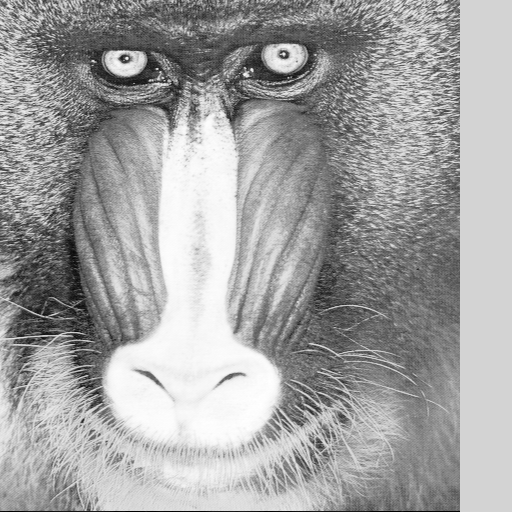
Let’s begin with a simple translation on the column coordinates by shifting the image to the left.
# First create identity grid
if image.ndim == 2:
    x = np.arange(0, image.shape[0], dtype=grid_dtype)
    y = np.arange(0, image.shape[1], dtype=grid_dtype)
xx, yy = np.meshgrid(x, y)
# Apply a translation
xx += 50.5

# Lets call the grid resampling
array_out_translation_left, _ = array_grid_resampling(
        interp="cubic",
        array_in=array_in,
        grid_row=yy,
        grid_col=xx,
        grid_resolution=(1,1),
        array_out=None,
        win=None,
        array_in_mask=None,
        grid_mask=None,
        array_out_mask=None,
        nodata_out=None,
        standalone=True,
        boundary_condition=None,
        trust_padding=False,
        )
array_out_translation_left[:, -53:]
array([[124.875 ,      nan,      nan, ...,      nan,      nan,      nan],
       [130.    ,      nan,      nan, ...,      nan,      nan,      nan],
       [102.8125,      nan,      nan, ...,      nan,      nan,      nan],
       ...,
       [102.5625,      nan,      nan, ...,      nan,      nan,      nan],
       [ 86.5625,      nan,      nan, ...,      nan,      nan,      nan],
       [  3.5625,      nan,      nan, ...,      nan,      nan,      nan]],
      shape=(512, 53))
As you can see, the right strip border is filled with NaN values. It is due to the fact that the grid target coordinates went outside of the image’s definition domain.
Please note that the filling with NaN is not the default behaviour and it occured because we set the nodata_out parameter to None.
Rotation transform
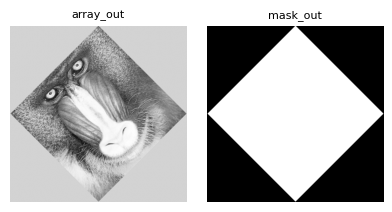
Here we define a grid in order to apply a 45 degree rotation.
In order to have the full image rotated please note that we have to extend the grid size.
center = np.asarray(array_in.shape) // 2
theta = np.pi/4.
# we know the image is square - here we extend the output grid in order to cover
# the full image
ext = image.shape[0] * (2**0.5 - 1) // 2

# First create identity grid
if image.ndim == 2:
    x = np.arange(0, image.shape[0] + 2 * ext, dtype=grid_dtype) - ext
    y = np.arange(0, image.shape[1] + 2 * ext, dtype=grid_dtype) - ext
xx, yy = np.meshgrid(x , y)
# Apply the rotation
xrot = (xx - center[1]) * np.cos(theta) - (yy - center[0]) * np.sin(theta) + center[1]
yrot = (xx - center[1]) * np.sin(theta) + (yy - center[0]) * np.cos(theta) + center[0]
# Lets call the grid resampling
array_out, mask_out = array_grid_resampling(
        interp="cubic",
        array_in=array_in,
        grid_row=yrot,
        grid_col=xrot,
        grid_resolution=(1,1),
        array_out=None,
        win=None,
        array_in_mask=None,
        grid_mask=None,
        array_out_mask=True,
        nodata_out=None,
        standalone=True,
        boundary_condition=None,
        trust_padding=False,
        )