Output control: nodata, validity mask, windowing
GridR gives you several knobs to control exactly what ends up in your output buffer: how invalid samples are reported, where in the output buffer the result is written, and which region of the output is computed in the first place. This page covers them all in one place.
What you’ll learn
Controlling invalid samples with
nodata_outProducing a validity mask with
array_out_maskSelecting a region of interest with
winPre-allocating
array_outfor tiled processingWriting into a sub-region of a larger buffer with
array_out_win
Setting the NoData output value and output mask
Let’s replay the previous translation transform by setting nodata_out to its default value, ie 0.
As you will see, the right strip border is filled with zeros.
We also take this opportunity to introduce the use of the array_mask_out parameter and examine the second array returned by the function. We will verify that the mask correctly matches the nodata region of the resampled image. Here we set the array_out_mask parameter to True ; that’s a convenient way to let the array_grid_resampling method allocate the right sized unsigned byte (ie. uint8) array and return it. Please note that we can also directly pass a preallocated array similarly to the array_out parameter.
array_out_translation_left, array_out_translation_left_mask = array_grid_resampling(
        interp="cubic",
        array_in=array_in,
        grid_row=yy,
        grid_col=xx_translated,
        grid_resolution=(1,1),
        array_out=None,
        win=None,
        array_in_mask=None,
        grid_mask=None,
        array_out_mask=True,
        nodata_out=0.,
        standalone=True,
        boundary_condition=None,
        trust_padding=False,
        )
array_out_translation_left[:, -53:]
array([[124.875 ,   0.    ,   0.    , ...,   0.    ,   0.    ,   0.    ],
       [130.    ,   0.    ,   0.    , ...,   0.    ,   0.    ,   0.    ],
       [102.8125,   0.    ,   0.    , ...,   0.    ,   0.    ,   0.    ],
       ...,
       [102.5625,   0.    ,   0.    , ...,   0.    ,   0.    ,   0.    ],
       [ 86.5625,   0.    ,   0.    , ...,   0.    ,   0.    ,   0.    ],
       [  3.5625,   0.    ,   0.    , ...,   0.    ,   0.    ,   0.    ]],
      shape=(512, 53))
Let’s display the output validity mask
array_out_translation_left_mask[:, -53:]
array([[1, 0, 0, ..., 0, 0, 0],
       [1, 0, 0, ..., 0, 0, 0],
       [1, 0, 0, ..., 0, 0, 0],
       ...,
       [1, 0, 0, ..., 0, 0, 0],
       [1, 0, 0, ..., 0, 0, 0],
       [1, 0, 0, ..., 0, 0, 0]], shape=(512, 53), dtype=uint8)

Apply a window
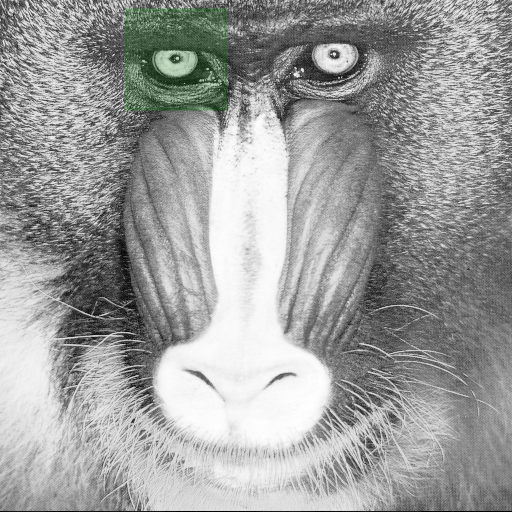
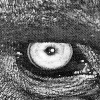
The array_grid_resampling method provides the win parameter in order to set a window to limit the region to compute.
The indices used in the win definition refers to indices considering the full resolution output.
Below, we first define a window centered on the mandrill’s left eye. Since we are considering an identity grid, the grid coordinates align with the input array’s image coordinates
win_center = np.array((58, 175)) # left eye
win_shape =  np.array((100, 100))
win = np.array((win_center - win_shape//2, win_center - win_shape//2 + win_shape - 1)).T
array_out_id_win_1_1, _ = array_grid_resampling(
        interp="cubic",
        array_in=array_in,
        grid_row=yy,
        grid_col=xx,
        grid_resolution=(1,1),
        array_out=None,
        win=win,
        array_in_mask=None,
        grid_mask=None,
        array_out_mask=None,
        nodata_out=None,
        standalone=True,
        boundary_condition=None,
        trust_padding=False,
        )
Pre-allocating the output buffer
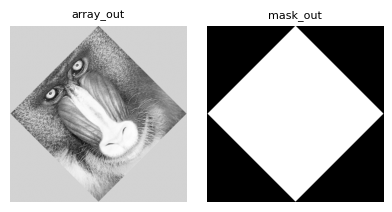
Let’s now replay the rotation transform. This time we will pre-allocate the output buffer.
# We have to init the out buffer with the right shape
array_out = np.zeros(xrot.shape, dtype=data_out_dtype, order="C")

# Lets call the grid resampling
_, mask_out = array_grid_resampling(
        interp="cubic",
        array_in=array_in,
        grid_row=yrot,
        grid_col=xrot,
        grid_resolution=(1,1),
        array_out=array_out,
        win=None,
        array_in_mask=None,
        grid_mask=None,
        array_out_mask=True,
        nodata_out=None,
        standalone=True,
        boundary_condition=None,
        trust_padding=False,
        )
plot_im({'array_out':array_out, 'mask_out': mask_out}, None, prefix='003_prealloc_buffer')
Specifying an output target window
In the previous step we opt to pre-allocate the output buffer for the image. What if the requested production window is smaller than the array_out buffer ?
# Set a window to focus on the left eye (we get the coordinates from the previous resampled image)
win = np.asarray([[250, 320], [120, 220]])

# We have to init the out buffer with an sufficient shape
array_out = np.zeros((200, 200), dtype=data_out_dtype)

# Lets call the grid resampling
_, mask_out = array_grid_resampling(
        interp="cubic",
        array_in=array_in,
        grid_row=yrot,
        grid_col=xrot,
        grid_resolution=(1,1),
        array_out=array_out,
        win=win,
        array_in_mask=None,
        grid_mask=None,
        array_out_mask=True,
        nodata_out=None,
        standalone=True,
        boundary_condition=None,
        trust_padding=False,
        )
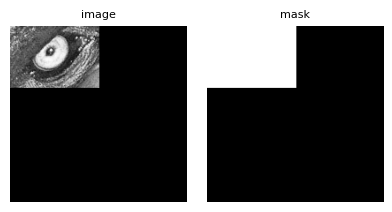
It’s worth noting that even without passing a preallocated output validity mask, the internally generated one will still match the shape of the array_out buffer.
As shown above, the resampled window is written starting at the origin of array_out (i.e., at [0, 0]).
In some cases - for example, when working with tiles that share a common output buffer - it may be necessary to write the result to a specific region within array_out.
This is precisely the purpose of the array_out_win parameter.
# Set a window to focus on the left eye (we get the coordinates from the previous resampled image)
win = np.asarray([[250, 320], [120, 220]])

# We have to init the out buffer with an sufficient shape
# Here we will also demonstrate that the resampling only modify the target window
# For that purpose we do not initialize with zeros but with arange
array_out = np.arange(200*200, dtype=data_out_dtype).reshape((200, 200)) % 255

# We also preallocate the validity mask for the same purpose
mask_out = np.arange(array_out.size, dtype=np.uint8).reshape(array_out.shape) % 10

# Let's define where we want to place the resampled window
array_out_win_origin = np.asarray([25, 40])
array_out_win = np.asarray([
    [array_out_win_origin[0], array_out_win_origin[0] + win[0][1] - win[0][0]],
    [array_out_win_origin[1], array_out_win_origin[1] + win[1][1] - win[1][0]]])


# Lets call the grid resampling
_, _ = array_grid_resampling(
        interp="cubic",
        array_in=array_in,
        grid_row=yrot,
        grid_col=xrot,
        grid_resolution=(1,1),
        array_out=array_out,
        array_out_win=array_out_win, # <= new parameter
        win=win,
        array_in_mask=None,
        grid_mask=None,
        array_out_mask=mask_out,
        nodata_out=None,
        standalone=True,
        boundary_condition=None,
        trust_padding=False,
        )
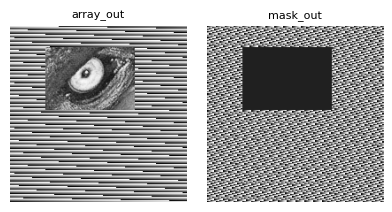
Note that this example also demonstrates that operating on a specific window only affects the corresponding region in the output array, leaving all other areas unchanged.