Masking inputs: grid and array masks
When your input data or grid contains invalid samples, you need a way to tell GridR about them so they don’t contaminate your output. This page covers the two complementary mechanisms: masking the grid itself and masking the input array.
What you’ll learn
GridR’s mask convention (0 = invalid, 1 = valid)
Masking the grid with a raster mask (
grid_mask)Masking the grid with an in-place sentinel value (
grid_nodata)Masking the input array with
array_in_maskHow
grid_resolutionaffects mask propagation
Working with masks
In this part we will see how to use masking.
The array_grid_resampling method provides several kind of masking for both the grid and the input array.
General convention
GridR resampling functionalities uses the following convention for mask :
masks are considered unsigned 8 bits integers taking value in {0, 1}.
a value of 0 is considered as non valid
a value of 1 is considered as valid
Grid masking
Grid masking with a raster mask
Here we use an 8 bit raster having the same shape of the grids in order to devalidate points in the grid.
To keep it simple we will demonstrate using an identity transform.
# First create identity grid
if image.ndim == 2:
    x = np.arange(0, image.shape[0], dtype=grid_dtype)
    y = np.arange(0, image.shape[1], dtype=grid_dtype)
xx, yy = np.meshgrid(x, y)
We define the mask as following :
the first 10 lines and last 20 lines are masked
the first 30 columns and last 40 columns are masked
a 80x80 window positionned at the grid center are masked
Please note the mask applies to the grid and not to the input image.
By convention, the mask is considered binary. A value of 0 corresponds to a masked cell, a value of 1 corresponds to a valid cell.
# setting a mask to devalidate margins and center
grid_mask_valid_value = 1
grid_mask_invalid_value = 0
# the final multiplication here is not necessary but we keep it to show the mechanic
grid_mask = np.ones(xx.shape, dtype=np.uint8) * grid_mask_valid_value
# masked pixels are positiv ones
grid_mask[0:10] = grid_mask_invalid_value
grid_mask[-20:] = grid_mask_invalid_value
grid_mask[:,0:30] = grid_mask_invalid_value
grid_mask[:,-40:] = grid_mask_invalid_value
# devalidate center
grid_mask[image.shape[0]//2-40:image.shape[0]//2+40, image.shape[1]//2-40:image.shape[1]//2+40] = grid_mask_invalid_value
The nodata_out is used to set the output value affected by the masking operation.
# Lets call the grid resampling
array_out, mask_out = array_grid_resampling(
        interp="cubic",
        array_in=array_in,
        grid_row=yy,
        grid_col=xx,
        grid_resolution=(1,1),
        array_out=None,
        win=None,
        array_in_mask=None,
        grid_mask=grid_mask,
        grid_mask_valid_value=grid_mask_valid_value,
        array_out_mask=True,
        nodata_out=0,
        standalone=True,
        boundary_condition=None,
        trust_padding=False,
)
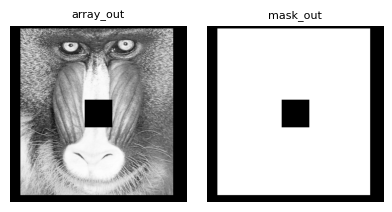
As in the previous example, we pass True to the function to obtain the validity mask output. We then check that it aligns correctly with the grid mask.
Masking with an inplaced grid nodata value
In this case, we avoid providing an additional mask, primarily to limit memory usage.
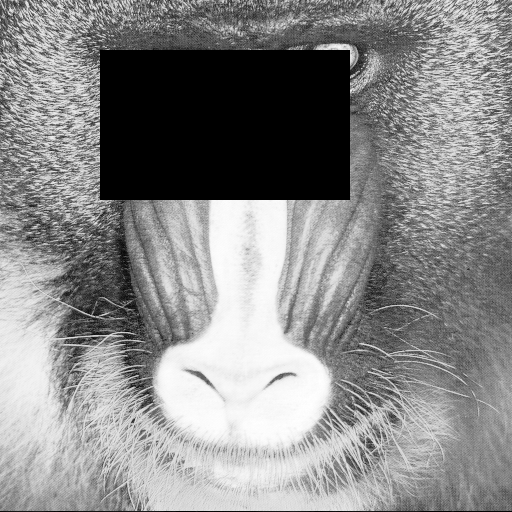
The array_grid_resampling method allows specifying a grid_nodata parameter, which is used to invalidate grid cells.
Cells in the grid whose values match this nodata value (within a fixed absolute tolerance of 1e-5) are treated as masked.
Providing a non-None value for grid_nodata activates the masking mechanism.
Note that it is not necessary to assign the nodata value to both grid coordinate arrays (row and column); setting it in either one is sufficient for the corresponding cell to be considered masked.
# Set a nodata value
grid_nodata = -999.
# Apply it to a window of the grid
yy[50:200,100:350] = grid_nodata
# Lets call the grid resampling
# Spoiler alert: this will fail !
try:
    array_out, _ = array_grid_resampling(
            interp="cubic",
            array_in=array_in,
            grid_row=yy,
            grid_col=xx,
            grid_resolution=(1,1),
            array_out=None,
            win=None,
            array_in_mask=None,
            grid_nodata=grid_nodata,
            grid_mask=grid_mask,
            grid_mask_valid_value=grid_mask_valid_value,
            array_out_mask=None,
            nodata_out=0,
            standalone=True,
            boundary_condition=None,
            trust_padding=False,
        )
except ValueError as e:
    display(e)
ValueError('Only one of `grid_mask` or `grid_nodata` may be provided, not both.')
The call failed, and the ValueError exception provides the reason: both masking modes, grid_mask and grid_nodata, cannot be used simultaneously.
# Lets remove the grid_mask parameter's definition
array_out, _ = array_grid_resampling(
        interp="cubic",
        array_in=array_in,
        grid_row=yy,
        grid_col=xx,
        grid_resolution=(1,1),
        array_out=None,
        win=None,
        array_in_mask=None,
        grid_nodata=grid_nodata,
        grid_mask=None,
        grid_mask_valid_value=None,
        array_out_mask=None,
        nodata_out=0,
        standalone=True,
        boundary_condition=None,
        trust_padding=False,
    )
Effect of Grid Resolution on Grid Masking
Both the raster mask and the invalid_value grid mask remain consistent with the sampling of the grid.
When the resolution differs from 1 in a given direction, interpolation must occur within each grid cell — that is, within the mesh defined by four neighboring grid nodes. In such cases, if at least one non-zero weighted node of the mesh is masked, the interpolated result is marked as invalid. This results in nodata values in the resampled image and corresponding invalid entries (value 0) in the output mask.
Let’s illustrate this behavior by zooming in on a small region.
# create identity grid on the eye
if image.ndim == 2:
    x = np.arange(130, 220, dtype=grid_dtype)
    y = np.arange(30, 100, dtype=grid_dtype)
xx, yy = np.meshgrid(x, y)

resolution = np.asarray((2,3))

# lets define the mask using grid_nodata
grid_nodata = -99999
yy[30, 35] = grid_nodata

array_out, mask_out = array_grid_resampling(
        interp="cubic",
        array_in=array_in,
        grid_row=yy,
        grid_col=xx,
        grid_resolution=tuple(resolution),
        array_out=None,
        win=None,
        array_in_mask=None,
        grid_nodata=grid_nodata,
        array_out_mask=True,
        nodata_out=0,
)
/home/docs/checkouts/readthedocs.org/user_builds/gridr/checkouts/latest/notebooks/../python/gridr/core/grid/grid_resampling.py:1784: UserWarning: Standalone mode is enabled : trust_padding will be ignored with `boundary_condition` set as `None`
  ) = standalone_preprocessing(
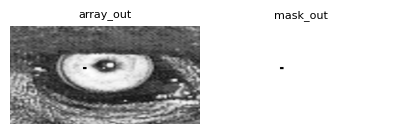
To invalidate a specific grid position, we’ve configured the input (30, 35). This grid coordinate directly corresponds to the (60, 105) output position in the output coordinate system.
print(mask_out[60-2:60+3,105-3:105+4])
print(f"Number of masked data : {np.where(mask_out==0)[0].shape}")
[[1 1 1 1 1 1 1]
 [1 0 0 0 0 0 1]
 [1 0 0 0 0 0 1]
 [1 0 0 0 0 0 1]
 [1 1 1 1 1 1 1]]
Number of masked data : (15,)
The masked area, as illustrated, exceeds a single pixel due to a resolution factor of 2 for rows and 3 for columns. The displayed array is centered on the position of the invalid grid node. Notably, this invalidation propagates to its immediate neighborhood, but exclusively for interpolated values where its weight is non-zero.
For clearer comprehension, in the schema below, an x denotes an invalid grid node, an o represents other grid nodes, and both - and * signify oversampled positions. It’s crucial to note that only the * positions utilize the x (invalid grid node) in their bilinear interpolation calculations.
 o - - o - - o
 - * * * * * -
 o * * x * * o
 - * * * * * -
 o - - o - - o
Input Array masking
Array masking with a raster mask
Here we use an 8 bit raster having the same shape of the input array in order to devalidate points in the input array.
Basically if input data is devalidate, interpolation that involves those data must be considered as not valid resulting in output valued to nodata_out and the optional array_out_mask set to 0 instead of 1.
To keep it simple we will demonstrate using a simple zoom transformation transform.
array_in_mask = np.ones(array_in.shape, dtype=np.uint8)
masked_pos = (60, 160)
array_in_mask[*masked_pos] = 0
# In order to check the good interpolation we will also set the array_in to hold an aberrant value
save_array_in = array_in[*masked_pos]

# Create a grid centered on the masked position
y = masked_pos[0] + np.linspace(-3, 3, 100)
x = masked_pos[1] + np.linspace(-3, 3, 100)
xx, yy = np.meshgrid(x, y)

# First compute a reference
array_out_womask_truth, _ = array_grid_resampling(
        interp="cubic",
        array_in=array_in,
        grid_row=yy,
        grid_col=xx,
        grid_resolution=(1,1),
        array_out=None,
        nodata_out=0,
        )

# Second compute without array masking to watch the effect of the non masked aberrant value
array_in[*masked_pos] = 1e7

array_out_womask, _ = array_grid_resampling(
        interp="cubic",
        array_in=array_in,
        grid_row=yy,
        grid_col=xx,
        grid_resolution=(1,1),
        array_out=None,
        array_out_mask=True,
        nodata_out=0,
        )

aberrant_radiation = np.zeros(array_out_womask.shape)
aberrant_radiation[np.where(array_out_womask - array_out_womask_truth != 0)] = 1

# Recompute with the mask
array_out, mask_out = array_grid_resampling(
        interp="cubic",
        array_in=array_in,
        grid_row=yy,
        grid_col=xx,
        grid_resolution=(1,1),
        array_in_mask=array_in_mask,
        array_out=None,
        array_out_mask=True,
        nodata_out=150, # Here we set nodata_out to 150 in order to have some texture for the display
        )
# restore array_in
array_in[*masked_pos] = save_array_in
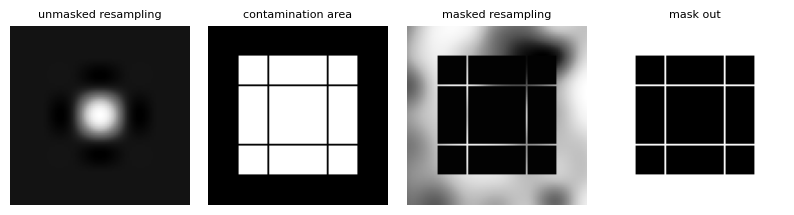
We have several plots to analyze here.
The first plot reveals what happens when the anomalous value is not masked. While the 8-bit display dynamic range prevents us from fully appreciating the valid interpolation, this plot effectively showcases the influence of an anomalous value (exaggerated for illustrative purposes) on the interpolation process.
The second plot, a binary representation, indicates where the anomalous value “spreads” or “irradiates.” Interestingly, some unaffected lines can be seen traversing the “irradiated” zone.
The third plot demonstrates the outcome when the anomalous value is successfully masked. We can see a clear correspondence between the no-data pixels and the “irradiated” area.
Lastly, the final plot presents the output validity mask, confirming its consistency with our earlier findings.
# min and max indices of masked data
upper_left = np.min(np.where(mask_out==0), axis=1)
lower_right = np.max(np.where(mask_out==0), axis=1)
print(f'upper left corner of masked data : {upper_left}')
print(f'lower right corner of masked data : {lower_right}')

# corresponding grid coordinates
print(f'masked data upper left corner grid coordinates : {yy[*upper_left], xx[*upper_left]}')
print(f'masked data lower right corner grid coordinates : {yy[*lower_right], xx[*lower_right]}')
upper left corner of masked data : [17 17]
lower right corner of masked data : [82 82]
masked data upper left corner grid coordinates : (np.float64(58.03030303030303), np.float64(158.03030303030303))
masked data lower right corner grid coordinates : (np.float64(61.96969696969697), np.float64(161.96969696969697))
The optimized bicubic interpolator uses a spatial support of ±2 around the target coordinates. This directly explains the masked area’s boundaries: row indices [58,62] and column indices [158,162].
Masked Interpolation Policy
To understand how GridR handles interpolation over masked data, we focus on the unmasked lines crossing the invalid region introduced earlier. Plotting the grid coordinates along these lines — distinguishing valid from invalid positions — will reveal an interesting behaviour at integer coordinate positions.
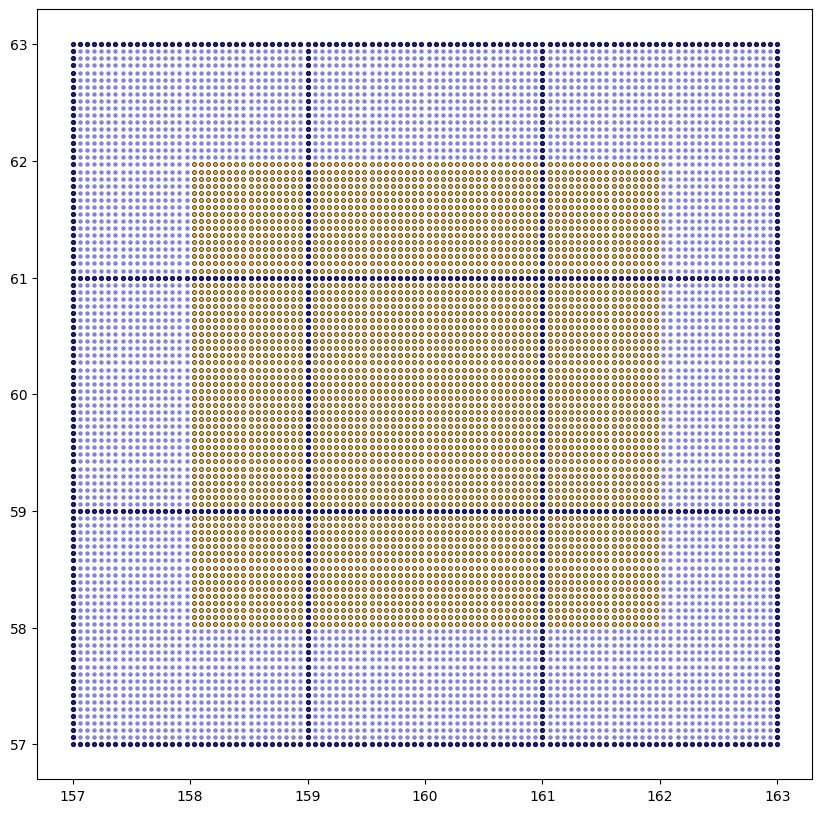
We’ve used a distinct style in the plot above to highlight coordinates that fall on exact integer values. This specific scenario, where we have whole integer coordinates within our grid, serves to prove that the GridR implementation aligns correctly with the “irradiated” area. It also shows that it avoids inadvertently masking pixels that should remain unmasked.
What makes integer coordinate positions unique? At these particular points, the kernel reduces to a Kronecker delta along at least one axis: one coefficient is exactly 1 and all others vanish. This means the interpolation retrieves the source value directly, without any weighted combination of neighbours. GridR currently implements a conservative policy when interpolating with masked data: in the convolution loop, samples with a zero kernel weight are explicitly skipped when evaluating the validity predicate — a masked neighbour with zero weight does not invalidate the result. This preserves the interpolating property of the kernel at grid nodes: if the target sample is valid, the output is valid, regardless of the mask state of the surrounding support.
Note that a strict policy — where the entire convolution support must be valid irrespective of kernel weights — is not currently implemented. The trade-off is worth mentioning: while the conservative policy avoids discarding valid data at grid nodes, it can introduce validity discontinuities in the output. A pixel at an integer coordinate may be marked valid while its immediate sub-pixel neighbour is not, since the latter draws on a broader set of contributing samples. This can produce spatially inconsistent validity masks, which may be unexpected in downstream processing.
User-defined Safe Window
If you know that a large portion of your input mask is fully valid, you can tell GridR to skip the per-sample validity check inside that region. This is the purpose of array_in_mask_safe_win: a two-row array declaring an inclusive rectangular safe window in (row_min, row_max), (col_min, col_max) form.
Inside the safe window, the interpolation core trusts the mask without inspecting it sample-by-sample, which speeds up the inner loop noticeably for typical masking patterns (border invalidity, small isolated invalid regions).
Important caveat: GridR trusts what you declare. If your safe window contains invalid samples, the output will silently be wrong in that region — there’s no runtime verification. Use this only when you have a strong upstream guarantee.
# Build an input mask: invalid patch in the top-left, valid elsewhere
array_in_mask = np.ones(array_in.shape, dtype=np.uint8)
array_in_mask[4:30, 13:23] = 0  # known invalid patch

# Declare the safe window: anything in rows 30..511, cols 23..511 is
# guaranteed valid by construction
safe_win = np.asarray([(30, array_in.shape[0] - 1),
                       (23, array_in.shape[1] - 1)])

# Build an identity grid
x = np.arange(0, array_in.shape[0], dtype=grid_dtype)
y = np.arange(0, array_in.shape[1], dtype=grid_dtype)
xx, yy = np.meshgrid(x, y)

array_out, mask_out = array_grid_resampling(
    interp="cubic",
    array_in=array_in,
    array_in_mask=array_in_mask,
    array_in_mask_safe_win=safe_win,   # <-- the new parameter
    grid_row=yy,
    grid_col=xx,
    grid_resolution=(1, 1),
    array_out=None,
    array_out_mask=True,
    nodata_out=0,
    boundary_condition="reflect",
    trust_padding=True,
    standalone=True,
)
plot_im({'output (cubic)': array_out, 'output mask': mask_out},
        prefix='004_safe_window')
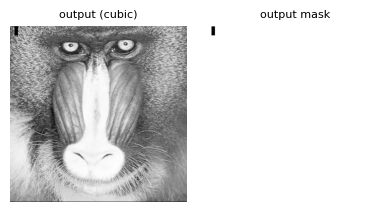
Functionally, the output is identical to what you’d get without array_in_mask_safe_win — the safe window is a performance hint, not a correctness mechanism.