Requesting an output validity mask
This notebook shows how to obtain a binary validity mask for the resampled output. Output pixels are flagged invalid when the resampling could not produce a meaningful value (out-of-domain grid nodes, masked input pixels, etc.). Setting nodata_out lets you detect them in the image; an explicit mask makes the validity check unambiguous.
What you’ll learn
How to open a dedicated dataset for the output mask
How to pass it to
basic_grid_resampling_chainthroughmask_out_dsThe GridR mask convention (
1 = valid,0 = invalid)The 1-bit GeoTIFF storage option
Setting things up
We build on top of the (8, 8) zoom case from the Getting Started notebook.
Adding a mask output dataset
Pass an opened writable dataset through mask_out_ds. GridR’s convention is 1 = valid / 0 = invalid. To minimise disk usage, the mask is stored as a 1-bit GeoTIFF (nbits=1 GDAL option).
with rasterio.open(GRID_IN_F64, "r") as grid_in_ds, \
        rasterio.open(RASTER_IN, "r") as array_src_ds, \
        rasterio.open(output_raster_path, "w", **raster_out_open_args) as array_out_ds, \
        rasterio.open(output_mask_path, "w", **mask_out_open_args) as mask_out_ds:

    basic_grid_resampling_chain(
        grid_ds              = grid_in_ds,
        grid_row_coords_band = 1,
        grid_col_coords_band = 2,
        grid_resolution      = grid_resolution,
        array_src_ds         = array_src_ds,
        array_src_bands      = 1,
        array_out_ds         = array_out_ds,
        interp               = "cubic",
        nodata_out           = 0,
        mask_out_ds          = mask_out_ds,    # <= dedicated mask dataset
    )
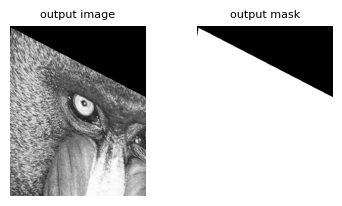
The output mask makes it easy to filter or composite the resampled image downstream. Subsequent notebooks add input-side masks (grid mask, source raster mask, geometry masks) that all propagate to this output mask.