Getting started with the GridR resampling chain
This tutorial introduces basic_grid_resampling_chain, the file-oriented wrapper around array_grid_resampling. The core function works on in-memory NumPy arrays; the chain layer manages all I/O against rasterio datasets and processes the output in memory-efficient strips and tiles.
This first notebook shows the minimal call: open a source raster, open a grid file, open a destination file, and let the chain do the rest.
What you’ll learn
How to prepare on-disk inputs for the chain (raster + grid)
How to open input/output rasterio datasets in a
withblockHow to call
basic_grid_resampling_chainwith minimal argumentsHow
grid_resolutioncontrols the output size
Setting things up
The chain reads from rasterio DatasetReader and writes to DatasetWriter objects opened by the caller. Before calling it we need:
A source raster on disk – here, the mandrill image.
A grid file on disk – a two-band GeoTIFF where band 1 holds row coordinates and band 2 holds column coordinates.
Both files are created above by the tutorial setup cell using the write_array and create_grid helpers from chain_notebook_utils.
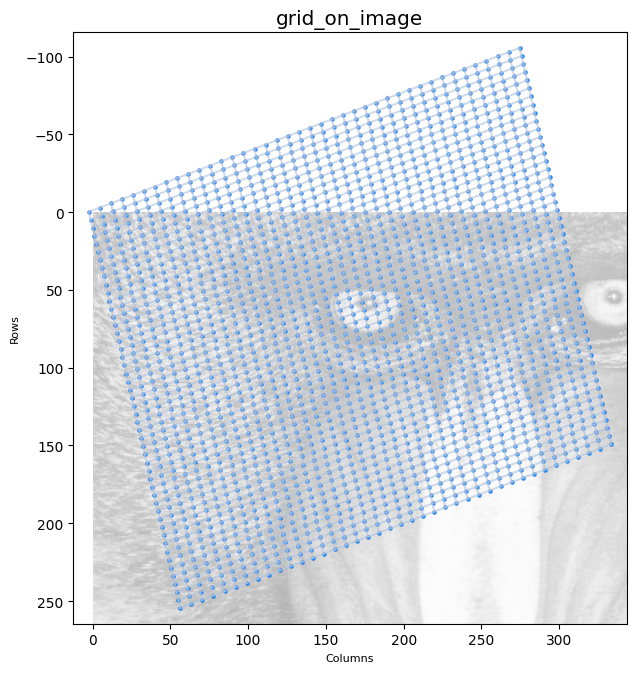
The grid is an affine-parameterised regular grid of shape (50, 40) mapped onto the source raster’s coordinate frame. The figure below overlays its nodes on the source image.
First call: identity resolution
At grid_resolution=(1, 1) the output has exactly as many pixels as there are grid nodes (50 × 40). The output dataset must be opened with matching dimensions.
output_shape_1_1 = grid_row_f64.shape

raster_out_open_args_1_1 = {
    "driver": "GTiff", "dtype": np.float64,
    "height": output_shape_1_1[0], "width": output_shape_1_1[1], "count": 1,
}

with rasterio.open(GRID_IN_F64, "r") as grid_in_ds, \
        rasterio.open(RASTER_IN, "r") as array_src_ds, \
        rasterio.open(output_raster_path, "w", **raster_out_open_args_1_1) as array_out_ds:

    basic_grid_resampling_chain(
        grid_ds              = grid_in_ds,
        grid_row_coords_band = 1,
        grid_col_coords_band = 2,
        grid_resolution      = (1, 1),
        array_src_ds         = array_src_ds,
        array_src_bands      = 1,
        array_out_ds         = array_out_ds,
        interp               = "cubic",
        nodata_out           = 0,
    )

The output is small because the grid subsamples the source raster heavily (each node is several source pixels apart). Out-of-domain nodes are filled with nodata_out.
Zooming with grid_resolution
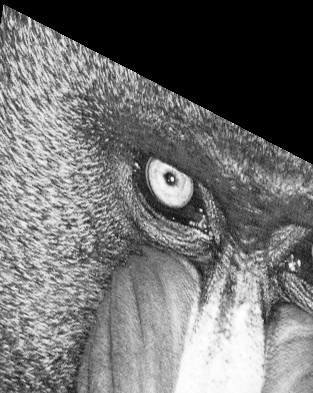
grid_resolution inserts additional output samples between adjacent grid nodes by bilinear interpolation of the node coordinates. Setting it to (8, 8) multiplies the output dimensions by 8 in each direction. The output shape must be sized accordingly using grid_full_resolution_shape.
from gridr.core.grid.grid_commons import grid_full_resolution_shape

grid_resolution = (8, 8)

output_shape = grid_full_resolution_shape(
    shape=grid_row_f64.shape, resolution=grid_resolution,
)

raster_out_open_args = {
    "driver": "GTiff", "dtype": np.float64,
    "height": output_shape[0], "width": output_shape[1], "count": 1,
}
print(f"output shape: {output_shape}")
output shape: (393, 313)
with rasterio.open(GRID_IN_F64, "r") as grid_in_ds, \
        rasterio.open(RASTER_IN, "r") as array_src_ds, \
        rasterio.open(output_raster_path, "w", **raster_out_open_args) as array_out_ds:

    basic_grid_resampling_chain(
        grid_ds              = grid_in_ds,
        grid_row_coords_band = 1,
        grid_col_coords_band = 2,
        grid_resolution      = grid_resolution,
        array_src_ds         = array_src_ds,
        array_src_bands      = 1,
        array_out_ds         = array_out_ds,
        interp               = "cubic",
        nodata_out           = 0,
    )
The next notebooks build on this minimal call by adding masks, geometry constraints, coordinate shifts and I/O controls one at a time.