build_mask with an input raster mask
This notebook covers the raster-input mode of build_mask: supplying a pre-existing binary mask through mask_in, possibly at a coarser resolution than the output. This is the right path when your validity information is already encoded as a (possibly low-resolution) mask raster rather than as vector polygons.
What you’ll learn
The role of
mask_in,mask_in_resolution,mask_in_target_win,oversampling_dtypeandmask_in_binary_thresholdHow
build_maskoversamples a coarse input maskHow to shift the oversampled mask via
mask_in_target_win
Setting things up
The arguments controlling the raster-input mode are:
mask_in– the input mask. Its shape must matchshapeunless amask_in_target_winis supplied.mask_in_resolution– the resolution ofmask_in. If it is not(1, 1), GridR oversamples the mask to full resolution using bilinear interpolation.mask_in_target_win– optional processing window in the target frame, expressed as((row_start, row_end), (col_start, col_end))(inclusive ends, GridR’s window convention).oversampling_dtype– floating-point dtype used internally during the bilinear oversampling step.mask_in_binary_threshold– after oversampling, values>=threshold are set to1, the rest to0. Default0.999ensures strict pixel validation.
Full-resolution input mask
We start with an input mask that already matches the target shape. No geometry is provided – only the input mask drives the result.
input_mask = np.full(shape, grid_mask.Validity.INVALID, dtype=np.uint8)
input_mask[1:4, 1:6] = grid_mask.Validity.VALID
display(input_mask)
array([[0, 0, 0, 0, 0, 0, 0, 0],
       [0, 1, 1, 1, 1, 1, 0, 0],
       [0, 1, 1, 1, 1, 1, 0, 0],
       [0, 1, 1, 1, 1, 1, 0, 0],
       [0, 0, 0, 0, 0, 0, 0, 0],
       [0, 0, 0, 0, 0, 0, 0, 0]], dtype=uint8)
raster = grid_mask.build_mask(
    shape                    = shape,
    resolution               = (1, 1),
    out                      = None,
    geometry_origin          = None,
    geometry_pair            = None,
    mask_in                  = input_mask,
    mask_in_target_win       = None,
    mask_in_resolution       = (1, 1),
    oversampling_dtype       = np.float64,
    mask_in_binary_threshold = 0.999,
)
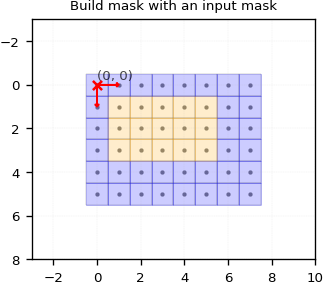
The output matches the input exactly – not impressive on its own, but it sets up the more interesting low-resolution case below.
Low-resolution input mask
Here we feed a small (3, 3) mask with mask_in_resolution = (4, 4), meaning each input mask cell covers a 4×4 block of output pixels. GridR oversamples it bilinearly to full resolution before applying the binary threshold.
input_mask_lowres = np.full((3, 3), grid_mask.Validity.INVALID, dtype=np.uint8)
input_mask_lowres[0, 1] = grid_mask.Validity.VALID
input_mask_lowres[1, 1] = grid_mask.Validity.VALID
input_mask_lowres[1, 0] = grid_mask.Validity.VALID
input_mask_lowres[2, 1] = grid_mask.Validity.VALID
input_mask_lowres[2, 0] = grid_mask.Validity.VALID
display(input_mask_lowres)
array([[0, 1, 0],
       [1, 1, 0],
       [1, 1, 0]], dtype=uint8)
raster_mask_in = grid_mask.build_mask(
    shape                    = shape,
    resolution               = (1, 1),
    out                      = None,
    geometry_origin          = None,
    geometry_pair            = None,
    mask_in                  = input_mask_lowres,
    mask_in_target_win       = None,
    mask_in_resolution       = (4, 4),
    oversampling_dtype       = np.float64,
    mask_in_binary_threshold = 0.99,
)
display(raster_mask_in)
array([[0, 0, 0, 0, 1, 0, 0, 0],
       [0, 0, 0, 0, 1, 0, 0, 0],
       [0, 0, 0, 0, 1, 0, 0, 0],
       [0, 0, 0, 0, 1, 0, 0, 0],
       [1, 1, 1, 1, 1, 0, 0, 0],
       [1, 1, 1, 1, 1, 0, 0, 0]], dtype=uint8)
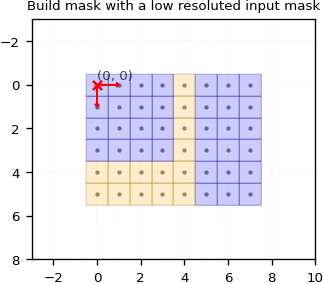
By default the oversampled mask is aligned with the output origin – the top-left corner of the input mask sits at the top-left corner of the output.
Shifting the input mask with mask_in_target_win
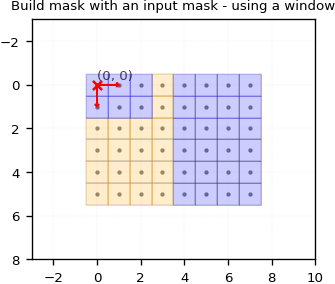
Setting mask_in_target_win lets you crop or shift the oversampled input mask. Here we shift it by (2, 1) to move its content down-right within the output frame.
raster = grid_mask.build_mask(
    shape                    = shape,
    resolution               = (1, 1),
    out                      = None,
    geometry_origin          = None,
    geometry_pair            = None,
    mask_in                  = input_mask_lowres,
    mask_in_target_win       = ((2, 2 + shape[0] - 1), (1, 1 + shape[1] - 1)),
    mask_in_resolution       = (4, 4),
    oversampling_dtype       = np.float64,
    mask_in_binary_threshold = 0.99,
)
display(raster)
array([[0, 0, 0, 1, 0, 0, 0, 0],
       [0, 0, 0, 1, 0, 0, 0, 0],
       [1, 1, 1, 1, 0, 0, 0, 0],
       [1, 1, 1, 1, 0, 0, 0, 0],
       [1, 1, 1, 1, 0, 0, 0, 0],
       [1, 1, 1, 1, 0, 0, 0, 0]], dtype=uint8)
The next notebook combines all three inputs (geometry_pair valid, geometry_pair invalid, mask_in) in a single build_mask call.