Pixel coordinate conventions and geometry origin
Before diving into mask generation, this notebook clarifies how GridR reasons about pixel coordinates and how geometries (Shapely polygons) are aligned with a raster. Picking the wrong convention is the most common source of off-by-half errors when masking with vector data.
What you’ll learn
How GridR defines a raster’s coordinate frame (
shape,resolution,origin)The two community conventions for pixel-center coordinates (Pixel is Point vs. Pixel is Area) and the one GridR adopts
The role of
geometry_originand how it lets you reuse geometries built against a different convention
Setting things up
import numpy as np
import shapely

from gridr.core.grid import grid_commons
A pixel and its coordinate frame
A pixel (short for picture element) is the smallest individual unit of a digital image. Conceptually, it is a tiny square dot carrying a single colour value at its centre. A raster image is just a grid of such pixels.
When performing a geometric transformation on a raster image it is critical to associate a coordinate frame with it. GridR defines this frame through three attributes:
shape– the dimensions of the raster (in pixels), as(nrows, ncols).resolution– the integer step size between adjacent samples along the same dimension. Relevant when working with resampling grids interpreted as rasters.origin– the floating-point coordinates of the centre of the upper-left (first) pixel.
Two conventions are widely used in the community for where a pixel’s centre lies in its coordinate frame:
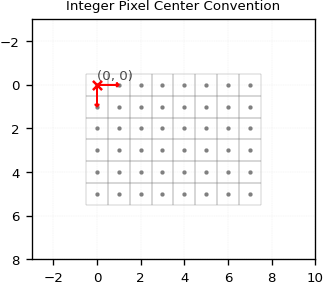
Pixel is Point: the centre of a pixel falls on whole integer coordinates – e.g. the first pixel is centred at
(0, 0). GridR uses this convention.Pixel is Area: the centre of a pixel falls on half-real coordinates – e.g. the first pixel is centred at
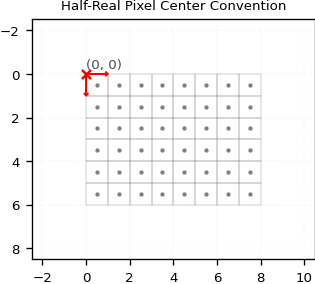
(0.5, 0.5). Many geometry libraries use this convention.
The two figures below illustrate the same (6, 8) raster under each convention. Compare where the pixel centres (orange dots) sit relative to the integer grid lines.
shape, resolution = (6, 8), (1, 1)
origin_int, origin_half = (0., 0.), (0.5, 0.5)

# Grid-coordinate arrays for both conventions, used by plotting helpers.
cxx_int,  cyy_int  = grid_commons.grid_regular_coords_2d(shape, origin_int,  resolution, sparse=False)
cxx_half, cyy_half = grid_commons.grid_regular_coords_2d(shape, origin_half, resolution, sparse=False)
Geometries and geometry_origin
GridR’s Python API supports Shapely Polygon, MultiPolygon and lists of Polygon objects as geometries. We focus on a single Polygon here for clarity.
A geometry in GridR is defined by two things: its shape (the polygon coordinates themselves) and its geometry_origin. The latter is the offset to apply to the polygon’s vertices to align them with GridR’s coordinate frame – it lets you keep geometries written against any convention without rewriting them.
Note – Shapely polygons use the
(x, y)coordinate order. GridR’sgeometry_origin, likeshape,resolutionandorigin, uses the(y, x)(row, column) order.
Below we define a polygon in the Pixel-is-Area convention (its vertices fall on .5 coordinates) and tell GridR about it by setting geometry_origin = (0.5, 0.5).
geometry = shapely.geometry.Polygon([
    (3.5, 2.5),
    (7.5, 2.5),
    (7.5, 6.5),
    (3.5, 6.5),
])
geometry_origin = (0.5, 0.5)
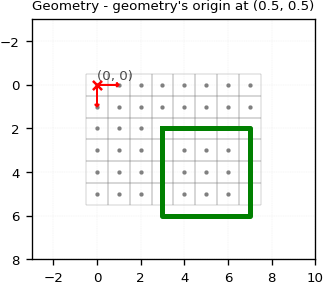
The polygon’s upper-left corner at (x=3.5, y=2.5) aligns with the centre of the pixel at (x=3, y=2) in GridR’s integer convention – exactly what the Pixel-is-Area convention claims.
Shifting the geometry origin
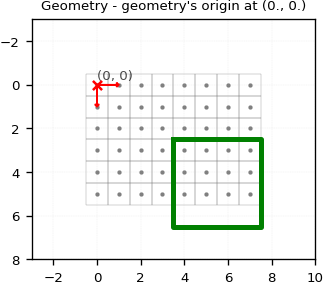
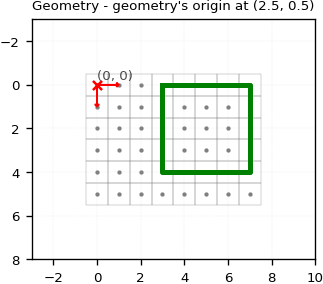
The next two figures show what happens if we lie about the geometry’s origin: setting it to (0., 0.) shifts the polygon by half a pixel, and setting it to (2.5, 0.5) shifts it by two and a half rows on top of the Pixel-is-Area correction.
Wrapping the full raster
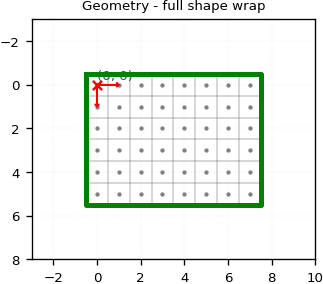
For reference, this is how to write a polygon that wraps the full raster under the integer convention – the vertices are offset by 0.5 on each side to enclose every pixel centre.
geometry_origin = (0., 0.)
geometry = shapely.geometry.Polygon([
    (-0.5,             -0.5),
    (shape[1] - 1 + 0.5, -0.5),
    (shape[1] - 1 + 0.5, shape[0] - 1 + 0.5),
    (-0.5,             shape[0] - 1 + 0.5),
])
The next notebook puts these conventions to work and shows how GridR’s rasterisation module turns geometries into binary rasters.