Using the GridR’s core build mask API
This guide demonstrates how to use GridR’s core masking feature.
It covers the following topics:
Definition of GridR’s adopted conventions
Basic usage and understanding of the
grid_rasterizemoduleCreating a mask applicable to raster data from vector geometries and predefined raster masks with the
grid_maskmodule
Setting things up
For this guide we have to import some tiers packages (numpy and shapely) and gridr.core.grid modules.
import numpy as np
import shapely

from gridr.core.grid import grid_rasterize
from gridr.core.grid import grid_commons
from gridr.core.grid import grid_mask
Introduction : Pixels, Images and Conventions
A pixel (short for “picture element”) is the smallest individual unit of a digital image. Imagine it as a tiny, square-shaped dot that contains a single color at its central position. Raster images are fundamentally composed of a grid of these pixels.
When performing a geometric transformation on a raster image, it’s crucial to associate a coordinate system with it. This system is defined by:
Shape: The dimensions (size) of the raster image.
Resolution: The integer step size between adjacent elements along the same dimension. This is particularly relevant when addressing resampling grids as rasters for tasks like mask generation.
Origin: The floating-point location of the center of the upper-left (first) pixel.
There are generally two conventions for defining pixel coordinates within the community:
Integer Coordinates for Pixel Center: The center of a pixel is associated with whole integer coordinates (e.g., (0, 0)). This is the convention adopted by GridR.
Half-Real Coordinates for Pixel Center: The center of a pixel is associated with half-real coordinates (e.g., (0.5, 0.5)). This convention is used by some geometric libraries.
Lets illustrate this 2 conventions in a simple case.
shape, resolution, origin_int, origin_half = (6, 8), (1, 1), (0., 0.), (0.5, 0.5)
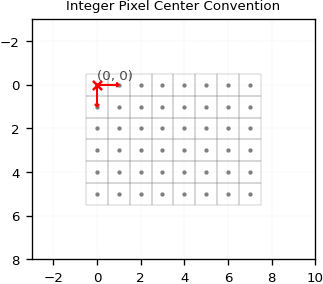
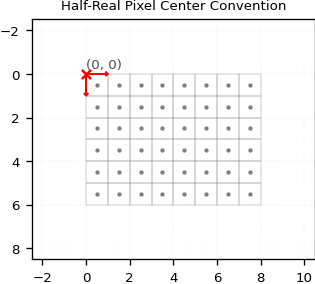
It’s crucial to grasp these concepts for manipulating geometries to define valid or invalid areas within a raster.
GridR’s python API methods currently support Polygon, MultiPolygon, or list of Polygon objects as geometries. To keep things simple, we’ll focus on a single Polygon here.
In GridR, a geometry is defined by its mathematical feature (e.g., a polygon) and its geometry_origin. This geometry_origin can differ from the coordinate system’s origin. This allows GridR to account for the conventions adopted by the geometry provider or apply a shift for its specific application.
It’s important to note that geometry adhere to Shapely’s xy-coordinate order whereas geometry_origin definition order is compliant with the yx-order previously adopted for origin, shape and resolution.
geometry_origin=(0.5, 0.5)
geometry = shapely.geometry.Polygon([
        (3.5, 2.5),
        (7.5, 2.5),
        (7.5, 6.5),
        (3.5, 6.5)
        ])
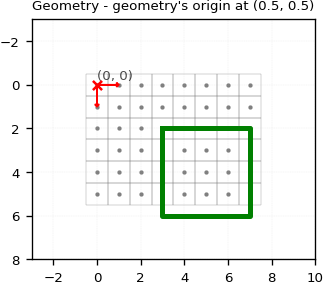
In the previous example, we set the geometry_origin to (0.5, 0.5). This implies the geometry is defined within a coordinate system where:
Pixel centers are treated as half-real coordinates.
The
geometry_origincoordinate needs to be aligned with the first pixel of the raster.
As you can see, the upper-left corner (x=3.5, y=2.5) correctly aligns with the center of the pixel cell at (x=3, y=2).
Let’s illustrate what happens when we change the geometry_origin to (0., 0.) in one case, and then to (-2.5, 1.5) in another.
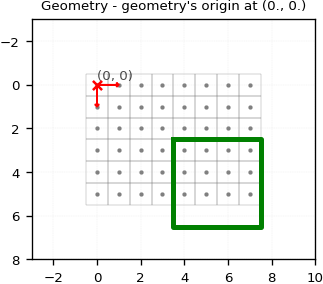
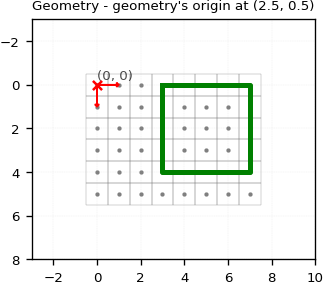
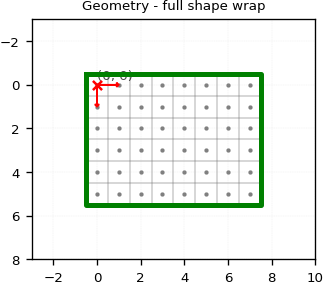
At last, lets define the geometry to wrap the full raster using the same convention.
geometry_origin=(0., 0.)
geometry = shapely.geometry.Polygon([
        (-0.5, -0.5),
        (shape[1]-1+0.5, -0.5),
        (shape[1]-1+0.5, shape[0]-1+0.5),
        (-0.5, shape[0]-1+0.5)
        ])
GridR’s rasterize module
Before adressing the main “masking” subject, we briefly describe here GridR’s rasterization feature, which is embedded in the Python grid_rasterize module and is the build_mask core method.
GridR integrates two libraries for rasterization: shapely and rasterio. While shapely-based methods are still available in the code, they are significantly outperformed by rasterio. Therefore, we will focus exclusively on the rasterio-based rasterization algorithm in this discussion.
Please note that GridR does not currently include a Rust implementation of a rasterization algorithm.
Let’s illustrate the usage of the grid_rasterize.grid_rasterize() method.
# Use the rasterio rasterize algorithm
alg = grid_rasterize.GridRasterizeAlg.RASTERIO_RASTERIZE
kwargs_alg = {}

# Define values to fill with
inner_value, outer_value, default_value = 1, 2, 0

# Reset the geometry to the previously used geometry
geometry_origin=(0.5, 0.5)
geometry = shapely.geometry.Polygon([
        (3.5, 2.5),
        (6.5, 2.5),
        (6.5, 4.5),
        (3.5, 4.5)
        ])

# Rasterize
raster = grid_rasterize.grid_rasterize(
        grid_coords=None,
        shape=shape,
        origin=geometry_origin,
        resolution=resolution,
        win=None,
        inner_value=inner_value,
        outer_value=outer_value,
        default_value=default_value,
        geometry=geometry,
        alg=alg,
        dtype=np.uint8,
        **kwargs_alg,
        )
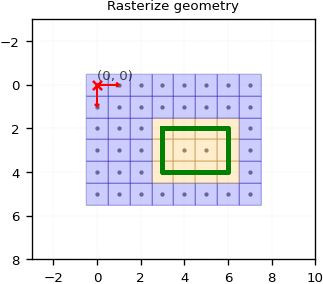
A lot’s happening here!
First, you might have noticed the grid_coords parameter set to None. There are two ways to define the target grid coordinate system: either by providing the coordinate array via grid_coords or by supplying the triplet (shape, origin, resolution).
You may also have seen that we passed geometry_origin as origin. This is actually the correct approach here, as grid_rasterize’s internal convention aligns with GridR’s convention, and it automatically handles the resolution.
Pixels whose centroids were inside or on the contour of the geometry have been “burned” to the inner_value (orange). The remaining pixels are considered outside the geometry and have been set to outer_value (blue). In this case, the default_value wasn’t used. It’s only applied if an empty list is passed as the geometry as illustrated below (a None-defined geometry will raise an exception).
# Rasterize
raster = grid_rasterize.grid_rasterize(
        grid_coords=None,
        shape=shape,
        origin=geometry_origin,
        resolution=resolution,
        win=None,
        inner_value=inner_value,
        outer_value=outer_value,
        default_value=default_value,
        geometry=[],
        alg=alg,
        dtype=np.uint8,
        **kwargs_alg,
        )
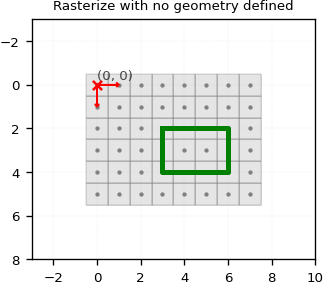
Let’s examine the win parameter. This parameter can be used to limit the computation to a subregion of the full-shaped target grid.
The window definition adheres to GridR’s window definition: a list of tuples defining the inclusive limit indices for all axes (row first, then column).
win=np.array([(1,3),(5,7)])

raster = grid_rasterize.grid_rasterize(
        grid_coords=None,
        shape=shape,
        origin=geometry_origin,
        resolution=resolution,
        win=win,
        inner_value=inner_value,
        outer_value=outer_value,
        default_value=default_value,
        geometry=geometry,
        alg=alg,
        dtype=np.uint8,
        **kwargs_alg,
        )
array([[2, 2, 2],
       [1, 1, 2],
       [1, 1, 2]], dtype=uint8)
As you can see, the output raster shape and values corresponds to the window.
Generating Masks with GridR
GridR provides the core.grid.grid_mask.build_mask method that can serve to generate mask.
Here is its signature :
def build_mask(
        shape: Tuple[int, int],
        resolution: Tuple[int, int],
        out: np.ndarray,
        geometry_origin: Optional[Tuple[float, float]] = None,
        geometry_pair: Optional[Tuple[Optional[GeometryType],
                Optional[GeometryType]]] = None,
        mask_in: Optional[np.ndarray] = None,
        mask_in_target_win: Optional[np.ndarray] = None,
        mask_in_resolution: Optional[Tuple[int, int]] = None,
        oversampling_dtype: Optional[np.dtype] = None,
        mask_in_binary_threshold: float = 0.999,
        rasterize_kwargs: Optional[Dict] = None,
        init_out: bool = False,
        ) -> Optional[np.ndarray]
Before we go further with this method, lets talk about GridR masking value convention.
In the same python module as the buil_mask method, GridR defines its convention for masking validity Value :
class Validity(IntEnum):
    """Define the GridR convention regarding validity
    """
    INVALID = 0
    VALID = 1
The docstring of this method is self explainatory. Here we quote the first lines :
The `build_mask` operates solely on raster data and does not perform I/O.
It combines information from two distinct mask types to build a binary raster
mask at a target resolution (currently only full resolution, i.e., (1,1), is implemented).
Have a look at the full docstring and code for further details !
You might now be familiar with some of the parameters in this method.
Let’s focus on the new ones.
The geometry_pair argument
The geometry_pair argument defines this mask using vectors. It expects a tuple with two GeometryType elements:
The first element represents valid geometries.
The second element represents invalid geometries.
GeometryType is a type defined in the core.grid.grid_rasterize module :
GeometryType = Union[
        shapely.geometry.Polygon,
        List[shapely.geometry.Polygon],
        shapely.geometry.MultiPolygon
        ]
It defines what kind of geometry are supported by the rasterization process.
Let’s play with this parameter.
First we reproduce the same as previously considering only a valid geometry.
# Use the rasterio rasterize algorithm
rasterize_kwargs = {
    'alg': grid_rasterize.GridRasterizeAlg.RASTERIO_RASTERIZE,
    'kwargs_alg': {}
}

# Reset the geometry to the previously used geometry
geometry_origin=(0.5, 0.5)

geometry_valid = shapely.geometry.Polygon([
        (3.5, 2.5),
        (6.5, 2.5),
        (6.5, 4.5),
        (3.5, 4.5)
        ])

# Build mask
raster = grid_mask.build_mask(
        shape=shape,
        resolution=(1, 1),
        out=None,
        geometry_origin=geometry_origin,
        geometry_pair=[geometry_valid, None],
        rasterize_kwargs=rasterize_kwargs,
        )
array([[0, 0, 0, 0, 0, 0, 0, 0],
       [0, 0, 0, 0, 0, 0, 0, 0],
       [0, 0, 0, 1, 1, 1, 1, 0],
       [0, 0, 0, 1, 1, 1, 1, 0],
       [0, 0, 0, 1, 1, 1, 1, 0],
       [0, 0, 0, 0, 0, 0, 0, 0]], dtype=uint8)
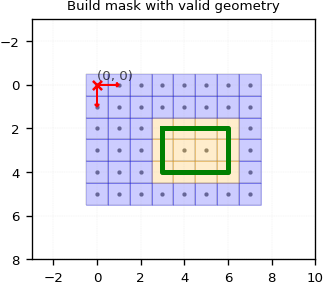
As you can see, we achieve the same result as before. Here, the Validity.VALID value fills the valid geometry, while Validity.INVALID fills the remaining pixels.
Now, let’s define a solo invalid geometry. We’ll make this a bit more complex by defining a couple of invalid Polygons.
geometry_invalid = [
    shapely.geometry.Polygon([
        (1.5, 1.5),
        (4.5, 1.5),
        (4.5, 2.5),
        (1.5, 2.5)
        ]),
    shapely.geometry.Polygon([
        (5.5, 3.5),
        (6.5, 3.5),
        (6.5, 4.5),
        (5.5, 4.5)
        ]),]

# Build mask
raster = grid_mask.build_mask(
        shape=shape,
        resolution=(1, 1),
        out=None,
        geometry_origin=geometry_origin,
        geometry_pair=[None, geometry_invalid],
        rasterize_kwargs=rasterize_kwargs,
        )
array([[1, 1, 1, 1, 1, 1, 1, 1],
       [1, 0, 0, 0, 0, 1, 1, 1],
       [1, 0, 0, 0, 0, 1, 1, 1],
       [1, 1, 1, 1, 1, 0, 0, 1],
       [1, 1, 1, 1, 1, 0, 0, 1],
       [1, 1, 1, 1, 1, 1, 1, 1]], dtype=uint8)
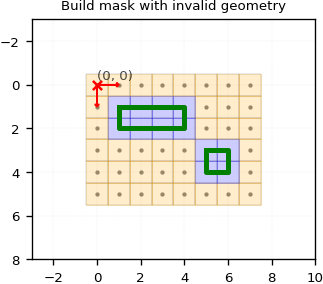
Here, the Validity.INVALID value fills the invalid geometries, while Validity.VALID fills the remaining pixels.
Now, let’s see what happens if we define both valid and invalid geometries.
# Build mask
raster_geom = grid_mask.build_mask(
        shape=shape,
        resolution=(1, 1),
        out=None,
        geometry_origin=geometry_origin,
        geometry_pair=[geometry_valid, geometry_invalid],
        rasterize_kwargs=rasterize_kwargs,
        )
array([[0, 0, 0, 0, 0, 0, 0, 0],
       [0, 0, 0, 0, 0, 0, 0, 0],
       [0, 0, 0, 0, 0, 1, 1, 0],
       [0, 0, 0, 1, 1, 0, 0, 0],
       [0, 0, 0, 1, 1, 0, 0, 0],
       [0, 0, 0, 0, 0, 0, 0, 0]], dtype=uint8)
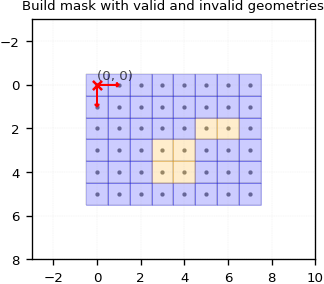
Let’s break down what’s happening here. For a pixel to be validated, it must be validated by both the valid and the invalid mask. Internally, two separate rasterizations are performed, and their results are then merged using a binary “AND” operation.
The mask_in and related arguments
You can also use build_mask with an input raster mask. It’s possible to define a resolution for this input mask, indicating if it’s undersampled compared to the output resolution. Keep in mind that the output resolution is currently limited to full resolution (i.e., (1, 1)).
When working with an input mask raster, you’ll need to provide these arguments:
mask_in: This is your input raster mask. If you don’t provide mask_in_target_win, its full shape must match the shape argument.mask_in_resolution: The resolution of your input mask. If it’s not (1, 1), GridR will oversample it to full resolution using bilinear interpolation.mask_in_target_win: (Optional) Use this to set the processing window as ((first_row, last_row), (first_col, last_col)). This adheres to GridR’s window definition.oversamping_dtype: The data type to use for the mask data during bilinear interpolation for oversampling.mask_in_binary_threshold: When oversampling, values greater than or equal to this threshold will be set to 1, and 0 otherwise. By default, this is set to 0.999 to ensure strict pixel validation.
First, let’s begin with an input raster that match the output shape. We will here only consider the input mask with no geometry defined.
# Init the mask to be invalid everywhere
input_mask = np.full(shape, grid_mask.Validity.INVALID, dtype=np.uint8)

# Define a valid area
input_mask[1:4, 1:6] = grid_mask.Validity.VALID
array([[0, 0, 0, 0, 0, 0, 0, 0],
       [0, 1, 1, 1, 1, 1, 0, 0],
       [0, 1, 1, 1, 1, 1, 0, 0],
       [0, 1, 1, 1, 1, 1, 0, 0],
       [0, 0, 0, 0, 0, 0, 0, 0],
       [0, 0, 0, 0, 0, 0, 0, 0]], dtype=uint8)
raster = grid_mask.build_mask(
        shape=shape,
        resolution=(1, 1),
        out=None,
        geometry_origin=None,
        geometry_pair=None,
        mask_in=input_mask,
        mask_in_target_win=None,
        mask_in_resolution=(1,1),
        oversampling_dtype=np.float64,
        mask_in_binary_threshold=0.999,
        )
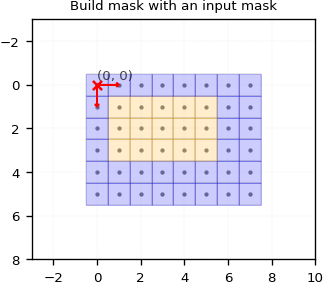
That’s not exactly impressive, is it ? We gave a mask as input and got the same mask back as output.
Let’s make things a bit more interesting by using the mask_in_resolution and mask_in_target_win parameters.
# Init the mask to be invalid everywhere
input_mask_lowres = np.full((3,3), grid_mask.Validity.INVALID, dtype=np.uint8)

# Define a valid area
input_mask_lowres[0, 1] = grid_mask.Validity.VALID
input_mask_lowres[1, 1] = grid_mask.Validity.VALID
input_mask_lowres[1, 0] = grid_mask.Validity.VALID
input_mask_lowres[2, 1] = grid_mask.Validity.VALID
input_mask_lowres[2, 0] = grid_mask.Validity.VALID
array([[0, 1, 0],
       [1, 1, 0],
       [1, 1, 0]], dtype=uint8)
Here we’re defining a small 3x3 mask. Let’s assign it a (4, 4) resolution. We still want the output to match the specified shape.
raster_mask_in = grid_mask.build_mask(
        shape=shape,
        resolution=(1, 1),
        out=None,
        geometry_origin=None,
        geometry_pair=None,
        mask_in=input_mask_lowres,
        mask_in_target_win=None,
        mask_in_resolution=(4, 4),
        oversampling_dtype=np.float64,
        mask_in_binary_threshold=0.99,
        )
array([[0, 0, 0, 0, 1, 0, 0, 0],
       [0, 0, 0, 0, 1, 0, 0, 0],
       [0, 0, 0, 0, 1, 0, 0, 0],
       [0, 0, 0, 0, 1, 0, 0, 0],
       [1, 1, 1, 1, 1, 0, 0, 0],
       [1, 1, 1, 1, 1, 0, 0, 0]], dtype=uint8)
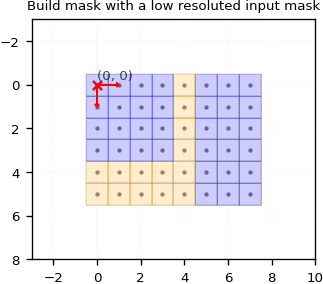
Here, the mask has been oversampled, and a default window with its origin aligned to the output origin has been applied.
Now, let’s define a window to shift the oversampled mask’s origin for the output raster.
raster = grid_mask.build_mask(
        shape=shape,
        resolution=(1, 1),
        out=None,
        geometry_origin=None,
        geometry_pair=None,
        mask_in=input_mask_lowres,
        mask_in_target_win=((2, 2+shape[0]-1), (1, 1+shape[1]-1)),
        mask_in_resolution=(4, 4),
        oversampling_dtype=np.float64,
        mask_in_binary_threshold=0.99,
        )
array([[0, 0, 0, 1, 0, 0, 0, 0],
       [0, 0, 0, 1, 0, 0, 0, 0],
       [1, 1, 1, 1, 0, 0, 0, 0],
       [1, 1, 1, 1, 0, 0, 0, 0],
       [1, 1, 1, 1, 0, 0, 0, 0],
       [1, 1, 1, 1, 0, 0, 0, 0]], dtype=uint8)
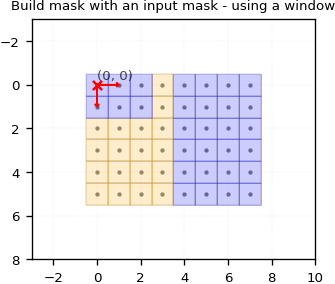
Here, we’ve set a window to shift the oversampled full-resolution mask’s origin by a (2, 1) displacement.
Using raster and vector masks all together
Let’s now demonstrate how all masking modes can work together.
We will use the same geometry masks as before and the last used input raster mask.
# Init the mask to be invalid everywhere
input_mask_lowres = np.full((3,3), grid_mask.Validity.INVALID, dtype=np.uint8)

# Define a valid area
input_mask_lowres[0, 1] = grid_mask.Validity.VALID
input_mask_lowres[1, 1] = grid_mask.Validity.VALID
input_mask_lowres[1, 0] = grid_mask.Validity.VALID
input_mask_lowres[2, 1] = grid_mask.Validity.VALID
input_mask_lowres[2, 0] = grid_mask.Validity.VALID

input_mask_lowres_resolution = (4, 4)

geometry_origin=(0.5, 0.5)

geometry_valid = shapely.geometry.Polygon([
        (3.5, 2.5),
        (6.5, 2.5),
        (6.5, 4.5),
        (3.5, 4.5)
        ])

geometry_invalid = [
    shapely.geometry.Polygon([
        (1.5, 1.5),
        (4.5, 1.5),
        (4.5, 2.5),
        (1.5, 2.5)
        ]),
    shapely.geometry.Polygon([
        (5.5, 3.5),
        (6.5, 3.5),
        (6.5, 4.5),
        (5.5, 4.5)
        ]),]
raster = grid_mask.build_mask(
        shape=shape,
        resolution=(1, 1),
        out=None,
        geometry_origin=geometry_origin,
        geometry_pair=[geometry_valid, geometry_invalid],
        mask_in=input_mask_lowres,
        mask_in_target_win=None,
        mask_in_resolution=input_mask_lowres_resolution,
        oversampling_dtype=np.float64,
        mask_in_binary_threshold=0.99,
        rasterize_kwargs=rasterize_kwargs,
        )
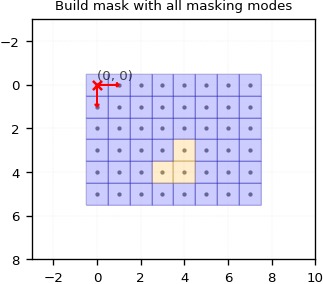
Only 3 pixels are valid here.
Remember, when combining valid and invalid geometries, a pixel must be validated by each geometry mode to be considered valid. The exact same principle applies when you add the input raster mask mode:
Generated mask from geometries
[[0 0 0 0 0 0 0 0] [0 0 0 0 0 0 0 0] [0 0 0 0 0 1 1 0] [0 0 0 1 1 0 0 0] [0 0 0 1 1 0 0 0] [0 0 0 0 0 0 0 0]]
Generated mask from input raster mask
[[0 0 0 0 1 0 0 0] [0 0 0 0 1 0 0 0] [0 0 0 0 1 0 0 0] [0 0 0 0 1 0 0 0] [1 1 1 1 1 0 0 0] [1 1 1 1 1 0 0 0]]
Binary AND merge
[[0 0 0 0 0 0 0 0] [0 0 0 0 0 0 0 0] [0 0 0 0 0 0 0 0] [0 0 0 0 1 0 0 0] [0 0 0 1 1 0 0 0] [0 0 0 0 0 0 0 0]]